Once a translated voiceover is ready, the next step is to match the speaker's lip movements to the new audio. How much does the GPU affect processing time? And how much longer does Pro take than Lite?
We processed the same 46.16-second, two-speaker video using Bonframe HD in Lite and Pro modes on four GPUs: the RTX 3090, RTX 4090, RTX 5090 and NVIDIA L40S.
In this test, the RTX 5090 had the shortest lip-sync inference time: about 71 seconds for Lite and 89 seconds for Pro, roughly 2.1 times the inference-stage speed of the RTX 3090. Across all four GPUs, Pro took approximately 20–25% longer than Lite during inference.
For Windows users, 8GB-class GPUs are a starting point to evaluate the low-memory path. The higher-capacity cards used below were selected to compare processing speed, not to establish minimum requirements. A separate historical low-memory configuration recorded generation-stage peaks of about 7 GiB. That makes 8GB-class consumer hardware worth evaluating with the low-memory configuration; it does not establish the speed or memory requirements of this round’s resident Lite/Pro configuration. See the consumer-GPU guidance below.
The Same Video and Voiceover on Every GPU
The test used a two-speaker conversation translated from Chinese into English. The video was 46.16 seconds long, at 1440×1080 resolution and 25 fps.
Translation and voice generation were completed beforehand. Every GPU received the same video, English voiceover and timing information for HD lip-sync generation. This kept changes in translation or voice generation from affecting the comparison.
We used a cloud test environment to compare hardware performance. Bonframe's desktop workflow continues to process locally; this benchmark does not mean the product requires video uploads or cloud computing.
Lip-Sync Inference Time Across Four GPUs
The table below measures the lip-sync inference stage, including processing video windows and writing their results. It excludes translation and voice generation, and does not represent the full wait from clicking Start to receiving the finished video.
| GPU | HD · Lite | HD · Pro |
|---|---|---|
| RTX 5090 | 71.2 seconds | 88.9 seconds |
| RTX 4090 | 95.5 seconds | 114.2 seconds |
| NVIDIA L40S | 105.5 seconds | 127.5 seconds |
| RTX 3090 | 149.1 seconds | 184.0 seconds |
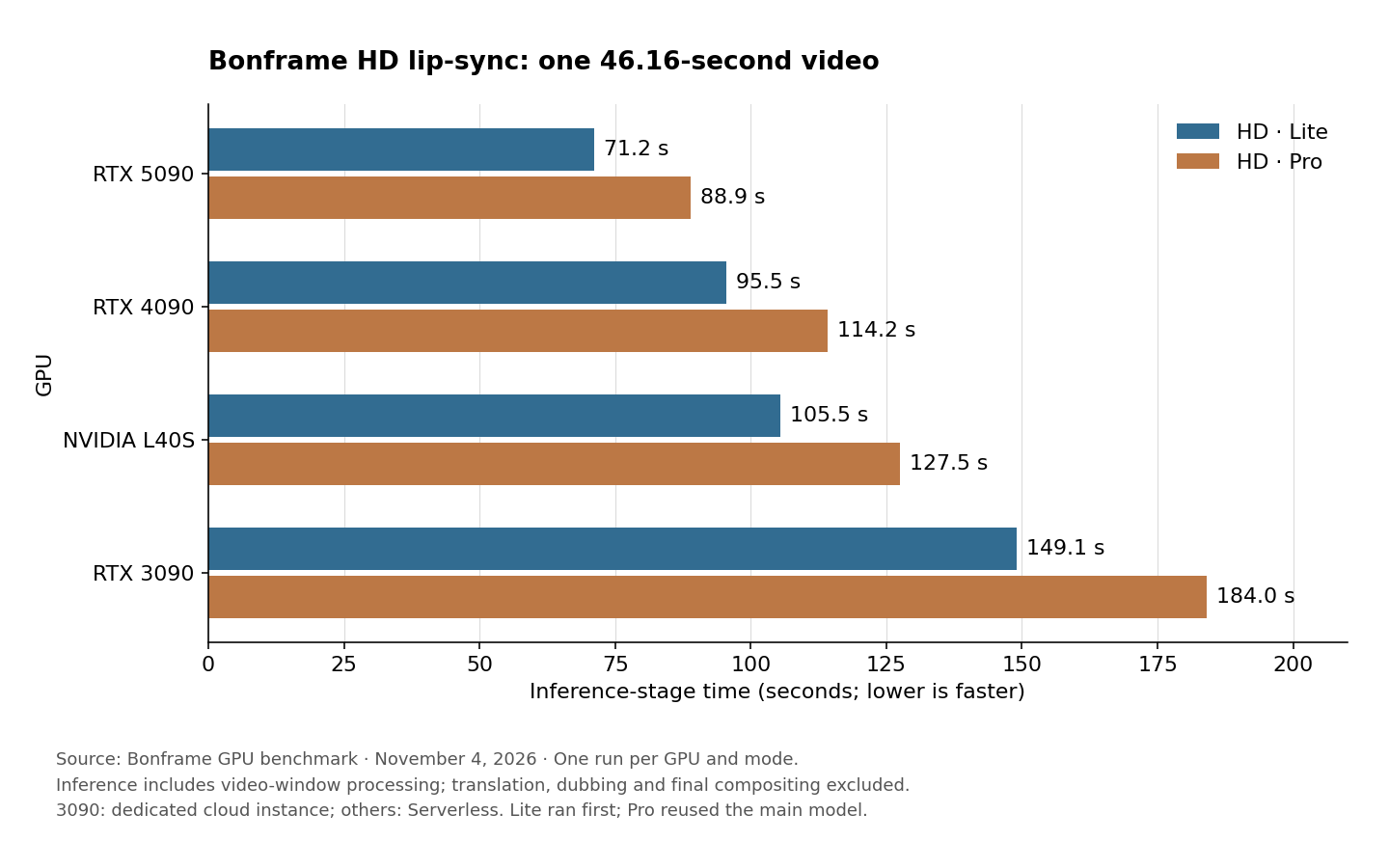
Both modes produced the same speed ranking in this test: RTX 5090, RTX 4090, L40S, then RTX 3090.
Compared with the RTX 3090, the RTX 4090 delivered approximately 1.6 times the inference-stage speed, while the L40S delivered approximately 1.4 times the speed. A GPU's theoretical compute performance or VRAM capacity does not translate directly into processing speed for a particular video task.
These results apply to this clip and test environment. Speaker count, facial movement, speaking intervals, and the system's CPU, memory and storage can all affect processing time.
Why Does Producing the Finished Video Take Longer?
Beyond inference, the task needs to locate faces, identify the active speaker, prepare the footage, composite the generated mouth movements back into the video, and encode the output.
Including these steps and media reads and writes within the test worker, task execution took the following amounts of time. These figures exclude cloud queueing, prior environment deployment, translation and voice generation.
| GPU | HD · Lite task execution | HD · Pro task execution |
|---|---|---|
| RTX 5090 | About 2 min 24 sec | About 2 min 34 sec |
| RTX 4090 | About 2 min 56 sec | About 2 min 57 sec |
| NVIDIA L40S | About 2 min 56 sec | About 3 min 10 sec |
| RTX 3090 | About 3 min 56 sec | About 4 min 17 sec |
Doubling inference speed does not necessarily halve the time needed to produce the finished video. Other stages still take time. All final videos in this test used CPU encoding; these results do not measure each system with its best hardware encoding configuration enabled.
How Much Longer Does Pro Take Than Lite?
For this clip, Pro added approximately 18–35 seconds to the lip-sync inference stage, an increase of about 20–25%.
If processing time is your priority, Lite was faster on every GPU tested. To compare visual results, use the same clip in both modes and inspect the mouth, teeth and facial details before deciding whether the additional processing time suits your needs.
This was a speed test, without a blind evaluation or objective image-quality scoring. Fast and Origin are also outside the main four-GPU results table. The quality guide below provides context when choosing a mode.
Fast, Lite, Pro and Origin: How Does Quality Differ?
With Origin as the quality reference, Bonframe's approximate mode-selection guide is: Fast at around 80%, Lite at around 95%, Pro at around 98%, and Origin as the highest-quality reference.
| Mode | Approximate quality relative to Origin | When to choose it |
|---|---|---|
| Fast | Around 80% | Prioritize quick previews; detail trade-offs are more visible, and some footage may show rippling or unstable textures |
| Lite | Around 95% | Balance speed and visual quality for everyday production |
| Pro | Around 98% | Prioritize detail retention for more demanding final videos |
| Origin | Reference; highest quality positioning of the four modes | Prioritize visual quality using the original VAE decoding path |
These percentages are approximate product selection guidance, not scores measured in this benchmark or standardized official quality ratings. The public LightVAE project provides reconstruction comparisons and PSNR measurements for the original VAE, Pro and Lite, but does not establish these percentages. Actual differences depend on the footage; inspect the mouth, teeth and facial textures when comparing modes.
Origin is the quality reference here; it does not mean that lip-sync generation or final video encoding is lossless. These quality estimates also do not translate into processing-speed ratios. Use the four-GPU results above for measured Lite and Pro processing times.
How Much VRAM Is Needed?
The GPUs tested have nominal capacities of 24GB for the RTX 3090 and RTX 4090, 32GB for the RTX 5090, and 48GB for the L40S. These are device capacities, not measured peak usage or minimum requirements. We did not collect peak VRAM usage for Lite or Pro in this round.
For historical context, on September 29, 2026, we processed a three-minute, 720p, multi-speaker video on an RTX 5090 using a low-memory mode. The recorded generation-stage peaks were:
| Historical test mode | Generation-stage peak VRAM reserved by the framework |
|---|---|
| SD · LightTAE at the time | 7,140 MiB, approximately 6.97 GiB |
| HD · Official VAE at the time | 7,104 MiB, approximately 6.94 GiB |
That historical low-memory path peaked at approximately 7 GiB during generation, rather than filling the test GPU's 32GB capacity. These results informed our earlier discussion of running on an 8GB-class GPU.
The historical tests used a different model-loading approach from this round's Lite and Pro tests. They cannot establish peak usage or minimum requirements for the current two modes. The figures also exclude some driver overhead and memory used by other applications. Running successfully on an actual 8GB GPU still requires system headroom and validation with the relevant configuration.
What About an RTX 3070, 4070 or 5070 on Windows?
You do not need to interpret our use of a 3090 or 5090 as a requirement to buy a high-end GPU. The low-memory path loads model sections in turn, trading some processing speed for a smaller GPU-memory footprint. The historical result was about 7 GiB of framework-reserved memory during generation, which is why 8GB-class and larger cards are relevant for local Windows testing.
For context, the desktop RTX 3070 has 8GB, the desktop RTX 4070 has 12GB, and the desktop RTX 5070 has 12GB. These are consumer options to evaluate with the supported local runtime and low-memory settings, rather than assuming a 24GB card is required. Laptop versions can have different specifications.
We have not benchmarked these three cards in this test, so we cannot promise “smooth” performance or quote their processing times. An 8GB card also has less headroom for the desktop, drivers and other applications than a 12GB card. Check the app’s current model/runtime requirements, close other GPU-heavy programs, and try a short clip in low-memory mode on the exact device before committing to longer projects. The historical peak does not guarantee every current SD/HD encoding fits in 8GB.
Reading These Results
All four GPUs completed HD video generation in both Lite and Pro modes. All eight outputs passed full audio and video decoding checks. Those checks establish that the files decode successfully; they do not replace a human assessment of lip-sync accuracy or visual quality.
Each GPU-and-mode combination was tested once. The tables show individual observations, not averages across repeated runs. Lite ran first on each GPU, followed by Pro. Pro reused the already-loaded main model, so the two modes did not have identical cold-start conditions.
The RTX 3090 also ran on a dedicated cloud instance, while the other three GPUs used Serverless, with differences in host systems. We report the corresponding inference and task execution times rather than ranking GPUs by cloud queueing delays. These cloud measurements should not be treated as speed guarantees for desktop computers with the same GPU model.